
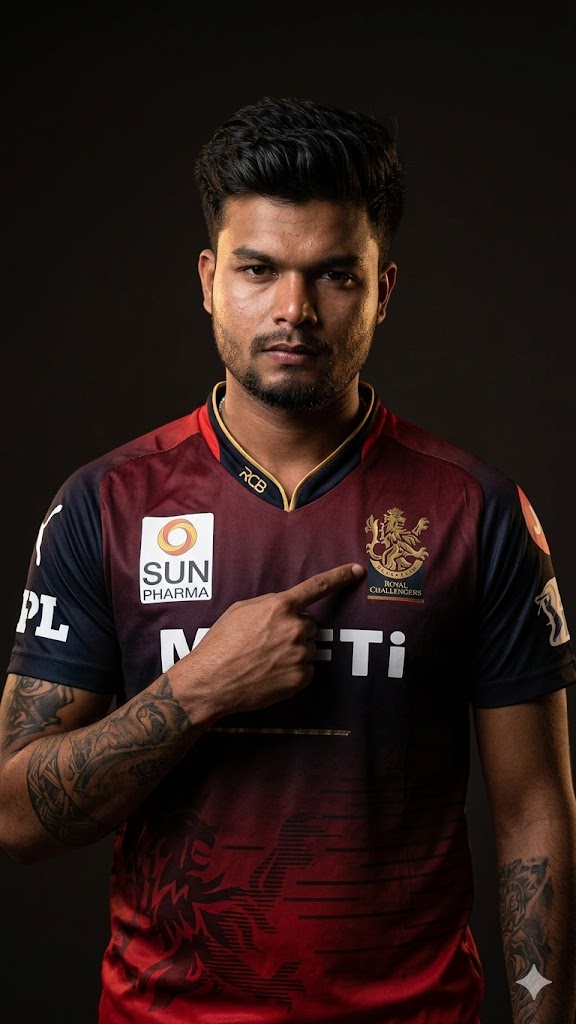
The IPL fever is always at its peak, and nothing says “Loyal RCB Fan” like a high-end, cinematic studio portrait. This specific AI prompt is designed to recreate that iconic King Kohli vibe—featuring the signature deep red and black gradient jersey, the classic gold accents, and a powerful “pointing to the crest” pose.
What makes this prompt special is its focus on low-key dramatic lighting and high-resolution textures. It doesn’t just create a generic image; it captures the intensity of professional sports photography. Whether you want to showcase your fandom on Instagram or create a digital avatar that looks exactly like you, this prompt is the perfect blueprint for a premium, realistic result.
The Premium Copy Card
Read more: RCB Virat Kohli ke sath Gemini AI prompt: RCB Victory Hug:
Pro-Tips Section (Hinglish)
- Name Customization: Agar aapko jersey par apna naam chahiye, toh prompt mein add karein: “with name ‘YOUR NAME’ written on the back” or shoulder.
- Jersey Number: Aap apna lucky number bhi add kar sakte hain, jaise “Jersey number 18 prominently visible.”
- Face Matching: 100% face matching ke liye humesha generate ki gayi AI image ko Remaker AI ya InsightFaceSwap (Discord) tool par upload karein aur apni real photo ke saath swap karein.
- Beard & Hair: Aap baalo ka style change kar sakte hain, bas prompt mein “short messy hair” ya “long hair with a headband” likh dein.
- Background Change: Agar aapko studio portrait nahi chahiye, toh “Standing inside Chinnaswamy Stadium crowd” likh kar background badal sakte hain.
Step-by-Step Guide (Hinglish)
- Prompt Copy Karein: Sabse pehle upar diye gaye premium card se prompt copy karein.
- AI Tool Open Karein: Bing Image Creator (Microsoft Designer) ya Midjourney par jayein.
- Prompt Paste Karein: Copy kiya hua text search box mein paste karein.
- Changes Karein: Agar aapko apna specific look (specs, different hairstyle) chahiye, toh prompt mein thode badlav karein.
- Generate Button Dabayein: ‘Create’ par click karein aur 10-15 seconds ka wait karein.
- Face Swap (Final Touch): AI image download karne ke baad, Remaker AI tool par jayein, apni real photo aur AI photo upload karein—aapka 100% face match taiyaar hai!