
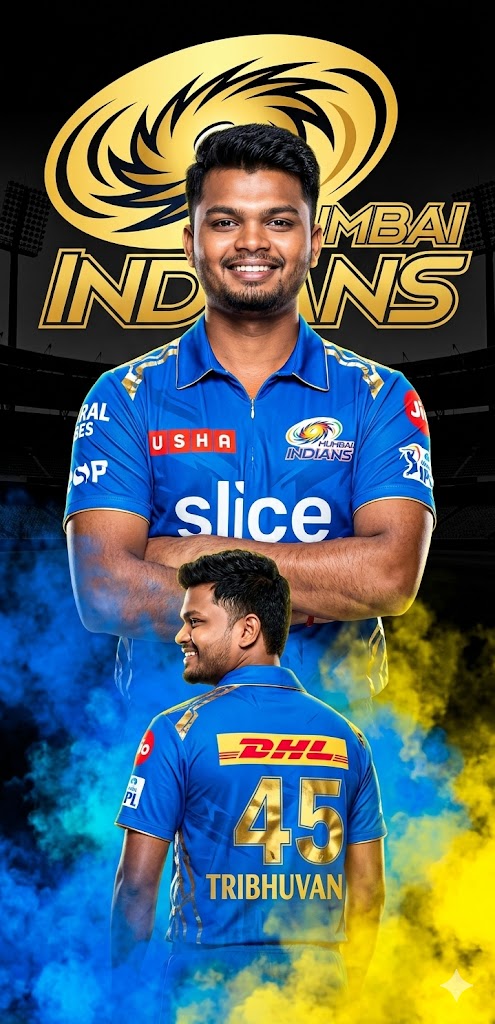
Cricket is not just a sport in India; it’s an emotion. And if you are a Mumbai Indians fan, you know that the “Paltan” vibe is all about strength, grit, and glory. This AI prompt is specially designed for fans who want to see themselves in the iconic Blue and Gold.
The prompt features a sophisticated double-exposure-style layout: a dominant, confident front-facing portrait combined with a cinematic back-view shot showcasing your name and favorite number. With high-contrast lighting, 8K resolution details, and a moody stadium backdrop, this isn’t just a simple edit—it’s a professional-grade sports poster. Whether you want to update your DP or create viral content for Instagram, this prompt delivers that “Aala Re” energy perfectly.
The Premium Copy Card
Read more: Lucknow Super Giants Jersey Gemini prompt copy-paste
Pro-Tips for Customization
- Name & Number: Prompt mein “45 TRIBHUVAN” ki jagah apna name aur lucky number likhein.
- Jersey Style: Agar aapko 2026 ki jagah vintage jersey chahiye, toh “Retro 2011 MI Jersey” mention karein.
- Facial Accuracy: Behtareen result ke liye AI tool mein apni clear front-facing photo upload karein aur “Exact face match” keyword ka use karein.
- Colors: Background smoke ka color change karne ke liye “blue smoke” ko “golden or white smoke” se replace kar sakte hain.
Step-by-Step Guide
- Step 1: Upar diye gaye Copy Prompt button par click karein.
- Step 2: Bing Image Creator ya Midjourney open karein.
- Step 3: Agar aap Bing use kar rahe hain, toh pehle apni photo upload karein (if using a tool that supports image-to-image) or phir prompt box mein text paste karein.
- Step 4: “Create” par click karein aur 10-15 seconds wait karein.
- Step 5: Aapke saamne 4 different versions aayenge. Jo sabse best lage, usse HD quality mein download kar lein!