
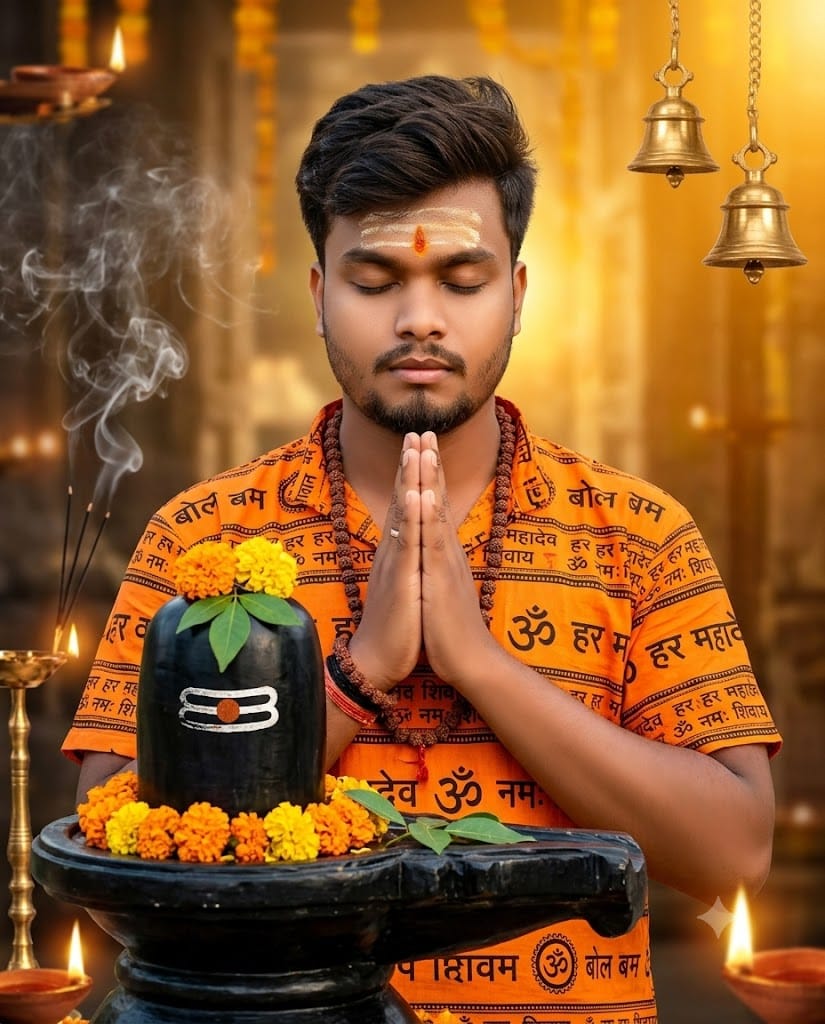
Immerse yourself in pure spiritual devotion with this breathtaking, hyper-realistic AI image prompt! Perfect for Sawan, Kanwar Yatra, and devotional celebrations, this prompt captures a young Indian man dressed in a traditional vibrant saffron-orange Bol Bam outfit. Standing in front of a grand, beautifully decorated Shiva Lingam with hands folded in Namaste and eyes closed in deep prayer, the scene exudes serenity, faith, and divine power.
What makes this prompt truly stand out is its rich atmospheric detail—featuring authentic Hindi calligraphy like “बोल बम” and “ॐ नमः शिवाय”, fresh Bel Patra leaves, marigold garlands, soft incense smoke, and golden volumetric light rays. Whether you are generating viral Instagram reels, devotional status updates, or high-resolution posters, this ultra-detailed prompt delivers an emotionally charged, 8K editorial-grade visual every single time!
Premium Copy Card
A cinematic, ultra-realistic 4:5 close-up portrait of a young Indian man wearing a vibrant saffron-orange Bol Bam outfit printed with "बोल बम", "हर हर महादेव", and "ॐ नमः शिवाय" in Hindi. He is standing before a beautifully decorated black Shiva Lingam, with both hands folded in Namaste (🙏), eyes gently closed in deep prayer and devotion. The Shiva Lingam is adorned with fresh Bel Patra leaves, white flowers, and bright orange marigold garlands. The temple is filled with soft incense smoke, glowing diyas, hanging brass bells, and warm golden light rays creating a divine atmosphere. He wears Rudraksha malas, sacred vibhuti on his forehead, and a peaceful expression of faith. Ultra-realistic DSLR photography, cinematic composition, shallow depth of field, HDR, volumetric lighting, premium color grading, highly detailed textures, 8K masterpiece, photorealistic, spiritual, serene, and emotionally powerful.."
Read more: Viral Mahashivratri AI photo editing prompt: Har Har Mahadev
Pro-Tips Section (How to Customize)
Iss prompt ko aap apne unique look and preferences ke hisaab se customize kar sakte hain:
- Outfit & Printed Text: Agar aapko printed Hindi text badalna hai, toh
"bol bam", "har har mahadev"ki jagah"Mahakal"ya"Jai Bholenath"edit kar sakte hain. - Custom Name & Details: Shirt par personalized touch ke liye prompt me
"with the name 'YOUR_NAME' printed in bold Hindi font on the chest"add kar dein. - Kanwar Yatra Element: Add a hands-folded pose in the place of an authentic Kanwar Yatra vibe.
- Lighting & Atmosphere: Darker, moody vibe ke liye
"warm golden light rays"ko replace karke"misty blue night lighting with glowing oil lamps and ethereal moonlight"likh sakte hain.
Step-by-Step Guide
AI tools me best hyper-realistic devotional images create karne ke liye in simple steps ko follow karein:
For Bing Image Creator (DALL-E 3):
- 15-second timer khatam hone ka wait karein aur “Copy Prompt” button par click karein.
- Bing Image Creator par jayein aur apne Microsoft account se sign-in karein.
- Prompt me to paste text.
- “Create” button press karein aur high-resolution photorealistic images render hone ka wait karein!
For Midjourney:
- Midjourney Discord server ya app open karein.
- Text bar me type karein:
/imagine - Copied prompt ko paste karein.
- Instagram post ya reel aspect ratio ke liye prompt ke end me
--ar 4:5ya--ar 9:16specify karein. - Press Enter to render your ultra-detailed spiritual masterpiece!
1 thought on “Divine Bol Bam Shiva Lingam AI Prompt:”