
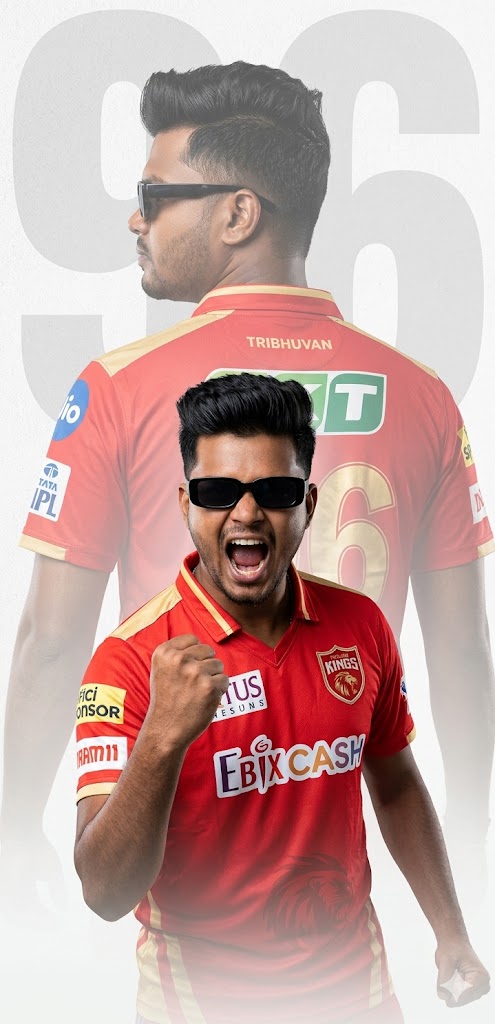
Are you a die-hard Punjab Kings (PBKS) fan looking to level up your social media game? Gone are the days of simple selfies! Today, we are sharing a premium, high-octane AI prompt that creates a professional-grade sports poster. This isn’t just any image; it features a sophisticated double exposure effect—blending a triumphant celebration with a faded silhouette from behind.
Whether you want to showcase your love for the Sher-e-Punjab or simply want a cool DP that looks like it was designed by a professional sports marketing agency, this prompt is your golden ticket. It perfectly captures the “Sadda Punjab” vibe with vibrant red and gold tones, sharp quiff hairstyles, and cinematic lighting.
The Premium Copy Card
Read more: Mumbai Indians T-shirt Gemini prompt:
Pro-Tips for Customization
Doston, is prompt ko aap apne hisaab se customize kar sakte hain taaki photo bilkul real lage:
- Name & Number: Prompt mein jahan “TRIBHUVAN” likha hai, wahan apna naam daalein aur “96” ki jagah apna favorite jersey number.
- Facial Features: Agar aap bearded look chahte hain, toh “clean-shaven” ki jagah “heavy stubble” ya “groomed beard” add karein.
- Team Change: Agar aap kisi aur team ke fan hain, toh “Punjab Kings (PBKS)” ko “Mumbai Indians” ya “RCB” se replace karein aur colors (red/gold) ko team colors ke hisaab se change karein.
- Accessories: Sunglasses ka style change karne ke liye “Aviator” ya “Wayfarer” keywords use karein.
Step-by-Step Guide (Kaise Banayein?)
- Copy the Prompt: Upar diye gaye card se prompt ko copy karein.
- Open Bing Image Creator: Google par ‘Bing Image Creator’ search karein ya Microsoft Designer open karein.
- Paste & Edit: Copy kiya hua text box mein paste karein. Dhyan rahe, “TRIBHUVAN” aur “96” ki jagah apni details zaroor likhein.
- Generate: Create a button par click karein. AI aapko 4 alag variants dikhayega.
- Download: Jo image sabse best lage, us par click karke high resolution mein download kar lein!