
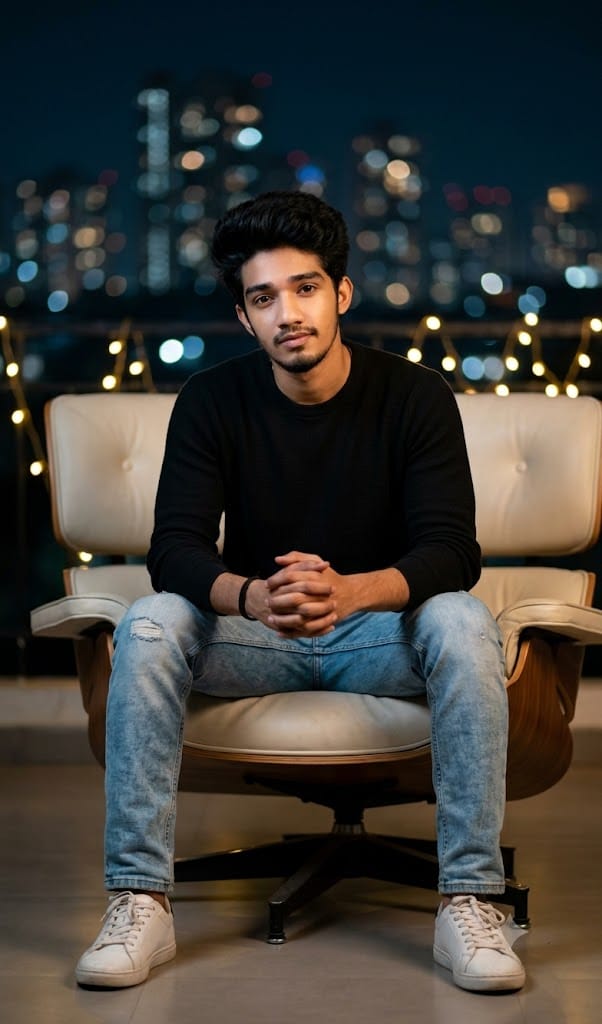
If you are looking to create a captivating, high-end urban portrait that radiates confidence and subtle warmth, this Urban Night Studio AI image prompt is exactly what you need. Combining modern minimalism with dramatic cinematic illumination, this prompt captures a sharp, realistic depiction of a young man relaxed on a sleek chair against a background of sparkling city skyline bokeh and golden fairy lights.
The contrast between the casual yet stylish outfit—a fitted black sweater, light blue jeans, and crisp white sneakers—and the rich, softly blurred night lights gives the entire composition an editorial, high-budget magazine feel. Whether you want to upgrade your personal branding, spice up your Instagram feed, or experiment with photorealistic portraiture, this prompt delivers crisp detail and incredible depth every time!
The Premium Copy Card
Studio-style night portrait of a young man sitting on a modern chair, black sweater, light blue jeans, white sneakers, hands clasped, confident calm expression, city skyline bokeh lights in background, warm fairy lights, shallow depth of field, sharp focus on face, cinematic lighting, ultra realistic photography."
Read more: Create SRH Jersey AI prompt: Google Gemini, stylish ai poster
Pro-Tips for Customization
- Outfit Customization: Agar aapko black sweater ke alawa kuch aur pehnana hai, toh text me
"black leather jacket over a white t-shirt"ya"maroon turtleneck sweater"likh sakte hain. - Background & Lighting Vibe: Night skyline mein variation ke liye
"cyberpunk neon bokeh lights"ya"classic glass rooftop lounge backdrop"include karein. - Accessories & Look: Apne character ko aur stylish banane ke liye prompts me
"wearing a silver luxury watch"aur"holding a ceramic coffee cup"jaisa personalized touch add kar sakte hain. - Camera Shot Details: Agar photo ka angle change karna ho, toh
"full-body shot"ya"close-up cinematic headshot"specify karein for accurate results.
Step-by-Step Guide
Option 1: Bing Image Creator Par Use Kaise Karein?
- Step 1: Copy card ke 15-second timer ke complete hone ka wait karein, fir “Copy Prompt” button par tap karke prompt copy kar lein.
- Step 2: Apne browser mein Bing Image Creator open karein aur Microsoft account se log in karein.
- Step 3: Input box mein prompt paste karein. Agar aap koi adjustments karna chahte hain (jaise hairstyle ya outfit colors), to modifications kar lein.
- Step 4: “Create” par click karein. Kuch hi seconds me aapke samne 4 realistic, high-quality cinematic portraits tayar ho jayenge!
Option 2: Midjourney Par Use Kaise Karein?
- Step 1: Copy kiya hua prompt apne paas ready rakhein.
- Step 2: Discord application par Midjourney Bot ya Midjourney ke official server ke
/newbieschannel me jayein. - Step 3: Command box mein
/imaginetype karein, aur text-box appear hote hi apna prompt paste kar dein. - Step 4: Professional photo finish & proper aspect ratio ke liye prompt ke end me ye flags zaroor lagayein:
--ar 4:5 --v 6.0 --style raw. Hit enter and download your render!