The Magic of Divine Connection in AI
Ganesh Chaturthi is a time of immense spiritual energy, devotion, and celebration in India. It’s a festival that connects hearts and homes to the benevolent Lord Ganesha. What if you could capture that feeling of profound devotion and divine protection in a single, deeply personal image? Our premium AI image prompt is designed to do exactly that.
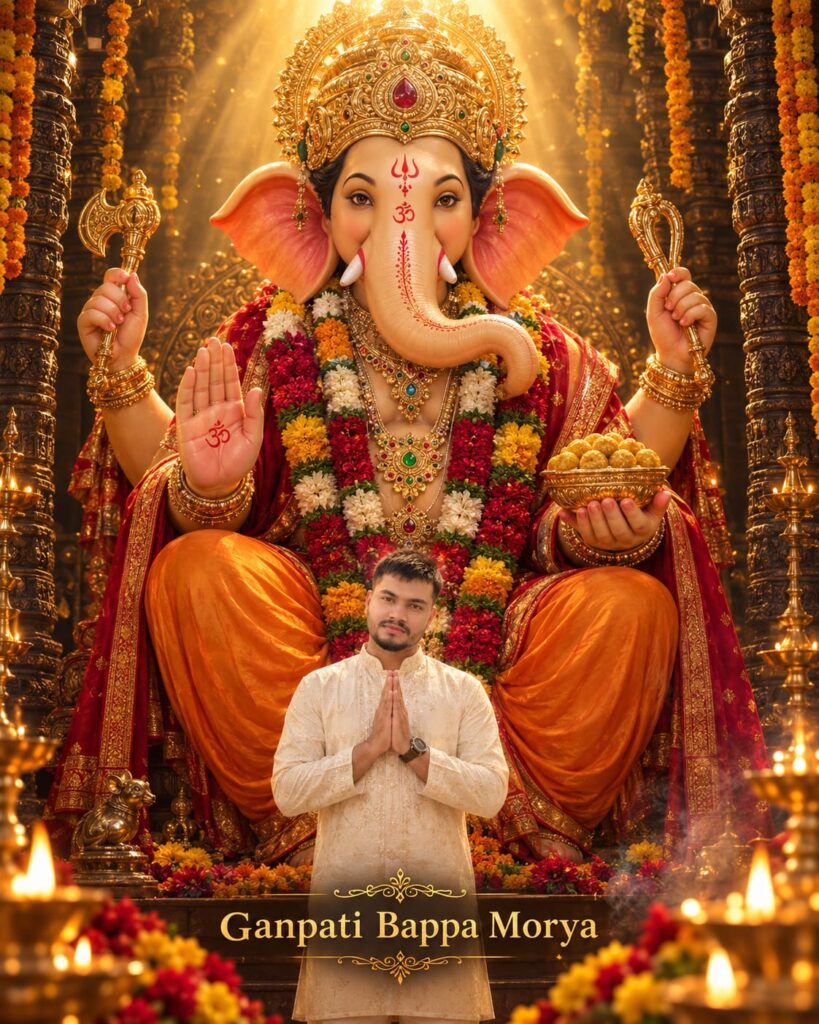
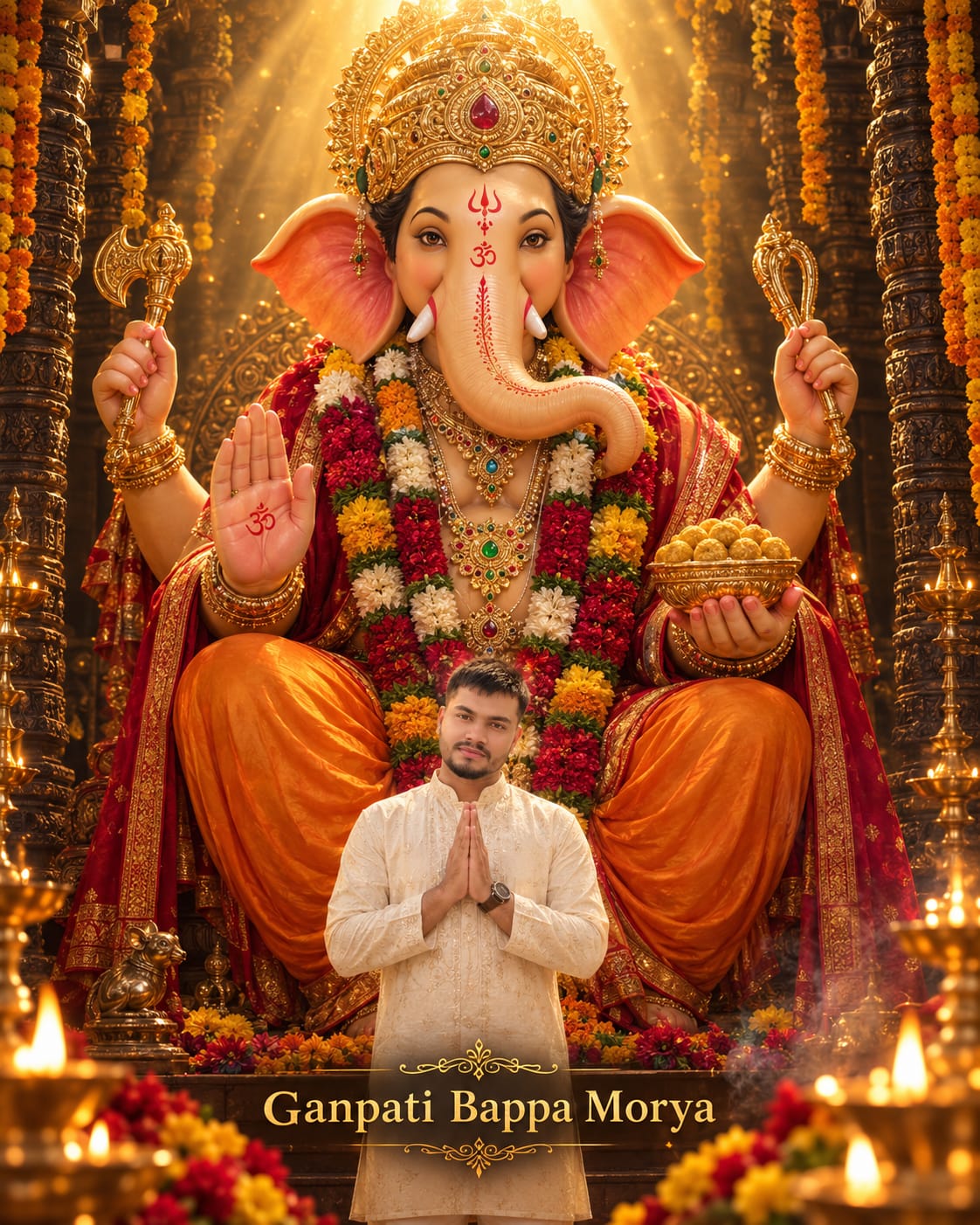
This prompt isn’t just about generating a beautiful image; it’s about putting you right into the heart of a sacred moment. Imagine standing respectfully, hands in namaste, beneath a monumental and majestic Lord Ganesha, who is bestowing his blessings. The prompt uses an ultra-photorealistic style to ensure that the final result feels incredibly authentic and emotionally powerful. The key feature is the identity reference, which allows you to use your own photograph to make the human devotee in the image look exactly like you, preserving your unique facial features and expression. It’s a way to create a deeply personal and meaningful digital keepsake for Ganesh Chaturthi, capturing the essence of ‘Ganpati Bappa Morya’ in a visually immersive and respectful way. This isn’t just AI art; it’s a personalized expression of faith.
Prompt
Create an ultra-photorealistic, majestic and emotionally powerful Ganesh Chaturthi devotional portrait in a vertical 4:5 aspect ratio, using my uploaded photograph as the sole identity reference for the human devotee.

Replace the existing person from the composition with me. Preserve my identity with extremely high accuracy. Keep my exact facial structure, face shape, eyes, eyebrows, nose, lips, jawline, ears, beard, moustache, hairstyle, hairline, skin tone, age, natural skin texture and distinctive facial characteristics. Do not recreate the identity of the person in the style reference. Do not beautify, reshape, slim, stylize or reinterpret my face.

Show me standing in the exact lower-centre foreground, directly beneath an immense and majestic Lord Ganesha. I should appear considerably smaller than Lord Ganesha, creating a powerful sense of divine scale, protection and spiritual presence. Show me from approximately the knees or thighs upward, facing forward with my hands joined naturally in a respectful namaste pose at chest level. Keep my shoulders relaxed, posture upright and expression peaceful, grateful, emotional and spiritually connected. My gaze may face the camera or turn slightly upward toward Lord Ganesha.

Dress me in a premium ivory or warm cream traditional Indian kurta with delicate tonal embroidery, subtle woven patterns, a refined band collar, long sleeves and matching cream trousers. Add a tasteful wristwatch. The clothing should appear naturally fitted with realistic fabric texture, embroidery, folds, shadows and proportions.

Behind me, create an enormous, magnificent Lord Ganesha seated on an elaborately decorated ceremonial throne. Lord Ganesha should occupy approximately 85% of the composition, with his crown approaching the upper edge, his ears extending widely across the frame and his body forming a protective visual frame around me.

Depict Lord Ganesha with warm peach-golden sculptural skin, compassionate expressive eyes, a gracefully curved trunk, detailed sacred forehead markings, a grand intricately carved golden crown with a central red gemstone, elaborate layered gold jewellery, red and green gemstones, heavy bracelets and arm ornaments. Dress him in luxurious saffron-orange silk garments and deep red fabric with fine gold borders. Add thick red, white and yellow flower garlands around his neck.

Show one front hand raised clearly in the abhaya blessing gesture, with realistic palm details and sacred markings. Show another hand holding a decorated golden bowl filled with laddus. The rear hands may hold ornate traditional ceremonial objects. Keep all four arms anatomically coherent, respectfully posed and visually balanced.

Lord Ganesha's expression should be calm, loving, benevolent and protective. He should feel like a monumental ceremonial idol infused with a subtle divine living presence. Keep the depiction realistic, sacred, dignified and emotionally reassuring.

Place the scene inside a grand traditional Indian temple or highly decorated Ganesh Chaturthi mandap. Add dark intricately carved pillars on both sides, marigold garlands, brass lamps, ceremonial vessels, flower decorations, incense smoke and warm festival lights. Keep the temple edges darker so the central subjects remain dominant.

Create dramatic golden divine light descending from the top centre behind Lord Ganesha's crown. Add powerful but soft volumetric light rays, a subtle halo, floating golden particles and atmospheric incense haze. Illuminate the crown, face, ears, trunk, jewellery and blessing hand with warm golden highlights.

Light my face naturally using soft warm frontal illumination, subtle diya reflections and a fine golden rim light around my hair and shoulders. Maintain realistic skin texture, facial shadows, depth and natural exposure. My face must not look pasted, plastic, over-smoothed or artificially bright.

Add blurred red, orange and yellow flower arrangements near the lower foreground, along with large softly blurred diya flames and brass lamps at the bottom corners. These foreground objects should create cinematic depth and frame the devotee without covering the body, folded hands or face.

Use a rich devotional colour palette of antique gold, amber, saffron orange, vermilion red, deep maroon, ivory cream and dark warm brown. Add only small emerald-green accents in the jewellery. Avoid cool colours and neon effects.

The composition should be perfectly balanced and almost symmetrical. Keep Lord Ganesha sharply detailed while using gentle cinematic depth of field around the foreground lamps and distant architecture. Use realistic materials, natural shadows, high dynamic range, controlled highlights, detailed jewellery, authentic flower textures and premium cinematic colour grading.

At the lower centre, add the text:

"Ganpati Bappa Morya"

Use an elegant luxury serif typeface with a refined metallic-gold finish, subtle glow, soft shadow and generous letter spacing. Add delicate symmetrical gold ornamental flourishes above and below the wording. Keep the typography premium, readable and integrated into the image without covering my face, folded hands or important devotional details.

The final result should resemble a premium cinematic Ganesh Chaturthi campaign poster photographed with a high-end full-frame camera: emotionally powerful, devotional, monumental, highly realistic, richly detailed, respectful and visually immersive.

NEGATIVE INSTRUCTIONS
Do not change or approximate my identity. Do not use the reference man's face. Do not make my face overly smooth, glamorous, artificial or pasted onto the body. Do not create an oversized human body. Keep the devotee smaller than Lord Ganesha.

Avoid distorted fingers, merged palms, extra arms, missing fingers, duplicate jewellery, malformed trunk, asymmetrical eyes, incorrect tusks, distorted feet, duplicate laddus or unnatural anatomy.

Do not make Lord Ganesha cartoonish, frightening, aggressive, plastic-looking or excessively muscular. Avoid cheap poster effects, excessive sharpening, oversaturated orange, harsh glow, neon colours, flat lighting, cluttered backgrounds, unreadable text and random religious symbols."
Read more: Ganpati saree portrait AI prompt: Copy this free ChatGPT & Gemini prompt below
Pro-Tips for a Perfect Devotional Portrait (Hinglish Guide)
Is prompt ko aur bhi personal banane ke liye yahan kuch tips hain:
- Photo Quality: Apni identity ko perfect rakhne ke liye ek high-quality aur clear portrait photo upload karein. Light achhi honi chahiye aur aapka face clearly visible hona chahiye.
- Kurta Color Change: Agar aap ivory cream ki jagah koi aur color chahte hain, jaise saffron orange, maroon, ya sky blue, toh bas prompt mein
ivory or warm creamko apne pasandida color se replace kar dein. - Text Customization: ‘Ganpati Bappa Morya’ text ko aap change kar sakte hain. Jaise ‘Happy Ganesh Chaturthi’ ya apna naam bhi add kar sakte hain (jaise “Blessings for [Your Name]”). Bas text string ko replace karein.
- Background Details: Temple background ko aur decorate karne ke liye
marigold garlandske saathrose petalsyacoconut leavesbhi add kar sakte hain.
Step-by-Step Guide to Using the Prompt
1. Copy the Prompt: Sabse pehle, upar diye gaye premium copy card mein timer khatam hone ka wait karein aur fir ‘Copy Prompt’ button par click karein.
2. Open your AI Tool: Apne preferred AI image generation tool ko open karein. Hum Bing Image Creator (free aur easy) ya Midjourney (premium aur high-quality) recommend karte hain.
3. Paste and Upload: Copy kiya hua prompt tool ke prompt box mein paste karein.
4. Upload Your Image: Ye sabse important step hai. Tool ke image upload section mein apni ek achhi photo upload karein, jiska use AI aapke face identity ke liye karega. a. Midjourney mein iske liye /imagine command ke baad image URL paste karein, fir prompt. Bing mein profile image setup karein.
5. Generate and Refine: ‘Generate’ button par click karein. AI image create karega. Agar aapko results pasand na aayein, toh fir se generate karein ya pro-tips ka use karke prompt mein thode changes karein.