
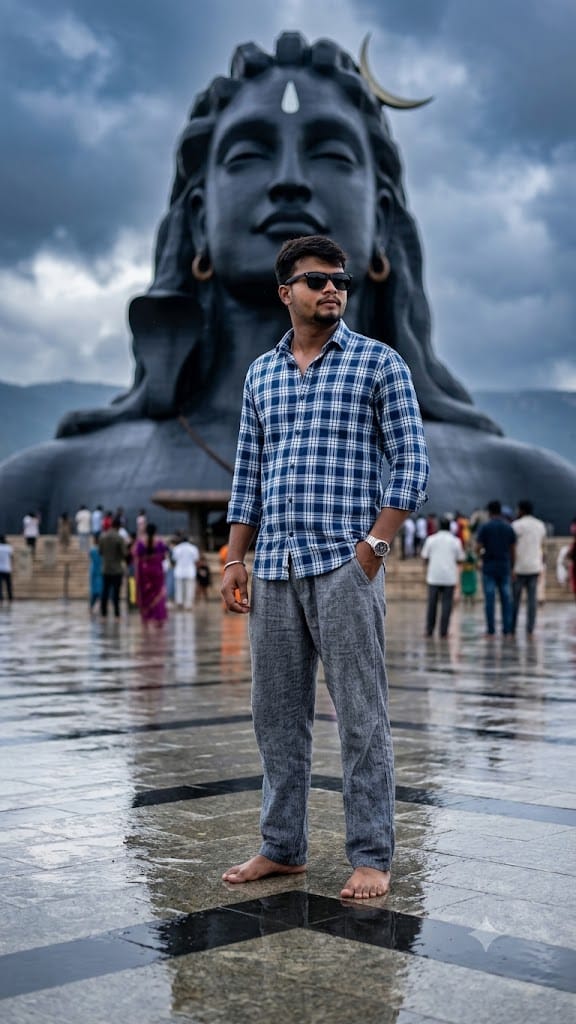
Standing before the majestic 112-foot Adiyogi Shiva statue at the Isha Yoga Center is a deeply moving experience, and bringing that spiritual grandeur into digital art requires exceptional prompt engineering. This Adiyogi Shiva Statue AI Image Prompt captures the quintessential monsoon aesthetic—a rain-drenched, highly reflective plaza set beneath dramatic overcast skies.
What makes this prompt truly special is its attention to photorealistic camera mechanics. Simulating an 85mm f/1.8 prime lens, the prompt balances a crisp portrait subject—featuring realistic skin textures, a classic plaid shirt, silver wristwatch, and stylish sunglasses—against a beautifully blurred backdrop with soft, natural HDR lighting. Whether you want to generate viral social media avatars or high-resolution editorial imagery, this prompt delivers cinematic masterpiece-quality results every single time.
The Premium Prompt
Ultra-realistic 8K cinematic portrait of a stylish young South Asian man standing barefoot on a rain-soaked reflective plaza in front of the massive Adiyogi Shiva statue at the Isha Yoga Center wears black sunglasses, a blue and white plaid full-sleeve shirt with rolled cuffs, loose grey textured trousers, and a silver wristwatch. One hand is in his pocket while he looks confidently to the side. Dramatic overcast monsoon sky with dark clouds, soft natural HDR lighting wet ground reflections, visitors in the background, centered composition, shallow depth of field, ultra detailed textures, realistic skin, cinematic color grading, DSLR quality 85mm lens, f/1.8, sharp focus, photorealistic masterpiece."
Read more: Viral Mahashivratri AI photo editing prompt: Har Har Mahadev
💡 Pro-Tips to Customize Your Prompt
Aap is prompt ko apne viral social media posts ya personal aesthetics ke according easily customize kar sakte hain:
- Outfit & Styling: Plaid shirt ke badle traditional look ke liye
a white cotton kurta-pyjama with folded sleevesya modern aesthetic ke liyea black oversized hoodie with dark jeanslikhen. - Lighting & Atmosphere: Overcast weather ko change karne ke liye
dramatic sunset with orange and golden sky reflecting on wet groundtry karein. Night scene ke liyenight view with golden spotlighting on Adiyogi statue and misty airadd karein. - Subject Customization:
young South Asian manko replace karke22-year-old South Asian woman with flowing hair wearing a pastel pink sareepaste kar sakte hain. - Pose Variations:
one hand in pocketKi jagahstanding in folded hands Namaste pose, paying respect to Adiyogi Shivainclude karein for a more spiritual touch.
🛠️ Step-by-Step Guide: How to Generate This Image
Iss AI prompt ko realistic outputs ke sath render karne ke liye simple steps follow karein:
Method 1: Using Bing Image Creator (Free)
- Copy the Prompt: Timer unlock hone ke baad copy the prompt button par click karke complete text copy kar lein.
- Open Bing Creator: Apne browser par
[bing.com/create](https://bing.com/create)(Microsoft Designer) open karein aur login karein. - Paste & Tweak: Text area me prompt paste karein. Agar aap exact face swapping perform kar rahe hain, toh Bing ke image-to-image/reference option me apni high-quality portrait upload karein.
- Generate: Create par click karein aur ultra-realistic 8K image output ka wait karein.
Method 2: Using Midjourney v6
- Discord open karke Midjourney bot channel ya personal server me jayein.
/imagineCommand fill karein aur copied prompt ko paste kar dein.- Aspect ratio define karne ke liye end me
--ar 3:4or--ar 9:16add karein for perfect mobile wallpaper composition. - Maximum photorealism aur sharp lens depth paane ke liye
--v 6.0 --style rawflag append kar sakte hain.
1 thought on “Adiyogi Shiva Statue AI Image Prompt: Create Photorealistic Monsoon Portraits in 8K”