
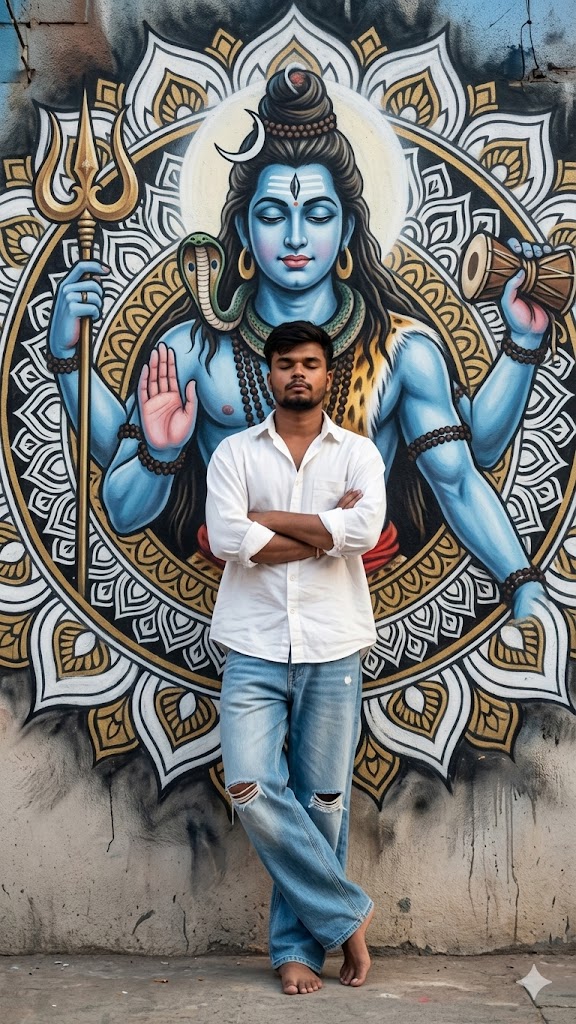
The “Aesthetic Street” vibe is taking over social media, but blending traditional spirituality with modern urban fashion requires a master-level prompt. This Divine Urban AI prompt is special because it focuses on extreme realism. It doesn’t just create an image; it mimics a professional wide-angle street photograph.
The highlight of this prompt is the contrast between the Lord Shiva mural—detailed with blue skin, trishula, and weathered graffiti textures—and the subject’s relaxed, grounded posture. With specific instructions for absolute face lock and “no AI plastic skin,” this prompt is perfect for creators who want an unposed, authentic look that feels like a high-end magazine shoot. Let’s get you that viral masterpiece!
The Premium Copy Card
Read more: Create Mahadev photo editing Gemini prompt:
Pro-Tips Section (Hinglish)
- Face Matching: Agar aapko exact apna face chahiye, toh Bing ya Midjourney mein apni high-quality photo upload karke link generate karein aur prompt ke starting mein paste karein.
- Mural Customization: Aap mural ko change kar sakte hain. Just replace “Lord Shiva” with “Lord Krishna” or “Hanuman Ji” and change the colors accordingly.
- Outfit Change: Shirt ka color badalne ke liye “white button-down” ko “black linen shirt” ya “beige oversized tee” se swap karein.
- Footwear: Agar aapko barefoot (nange pair) nahi rehna, toh prompt mein “premium white sneakers” add kar dein.
Step-by-Step Guide (Hinglish)
- Prompt Copy Karein: Sabse pehle upar diye gaye tool se 15 seconds wait karke prompt copy karein.
- AI Tool Open Karein: Go to Bing Image Creator or Midjourney.
- Reference Photo: Midjourney use kar rahe hain toh
/imaginecommand ke saath apni image URL aur phir ye prompt paste karein. - Generate Karein: Dabayein ‘Create’ button aur 4 variants ka wait karein.
- Face Swap (Pro Step): Agar face match thoda kam hai, toh Remaker AI ya InsightFaceSwap use karke apna real face image par laga lein.
- Download & Post: Final image ko upscale karein aur Instagram par “Divine Energy” vibes ke saath post karein!