
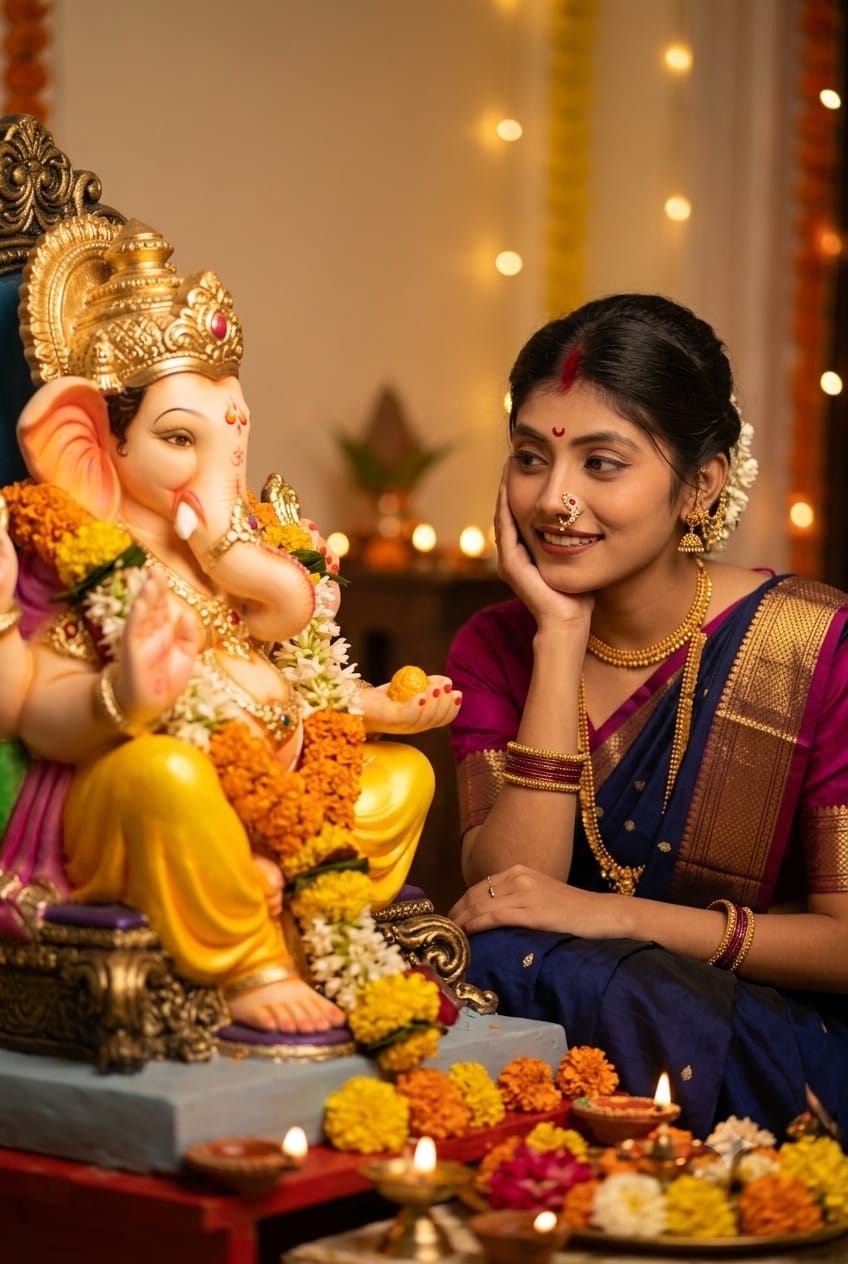
Two subjects. One frame. One powerful moment. 🙏✨
And here’s the detail that most Ganpati prompts leave to chance—a clearly visible, intentional gap between you and Bappa, creating a natural sense of depth and connection.
The most important part? Your gaze is precisely directed toward Bappa’s eyes so that your eyes visibly meet across the space between you.
This small detail makes the image feel more real, emotional, devotional, and cinematic.
Copy this free ChatGPT & Gemini prompt below 👇🪔
Celebrate the spirit of Ganesh Chaturthi with a deeply moving and visually captivating AI-generated portrait. This premium prompt allows you to create a high-quality, photorealistic image that perfectly captures the essence of devotion and serenity. Inspired by the provided composition, this prompt features a beautiful Ganpati Ji idol and a devotee, creating an intimate and spiritual atmosphere.
The Premium Copy Card
Use my uploaded photo as the identity reference and preserve my face faithfully. Create a highly photorealistic, cinematic Indian devotional portrait during Ganesh Chaturthi, inspired by the provided reference composition.

Frame the scene vertically in a 2:3 portrait ratio. Place a beautifully decorated Ganpati Ji idol on the left side of the frame and me seated on the right side, with both faces clearly visible. Do not place us too close together. Keep me slightly farther away from Ganpati Ji, leaving a natural visible gap between my face/hand and the idol's trunk so the composition has comfortable breathing room. Make me approximately 8-12% smaller in the frame than a tight close-up and position me slightly farther to the right.

Ganpati Ji should appear large and majestic but partially cropped by the left edge of the frame. Show the ornate golden crown, one expressive eye, forehead markings, cheek, beautifully curved trunk, part of the raised blessing hand, floral garlands and decorative ornaments. The idol should feel physically close to the camera while still leaving enough space between the idol and me.

I am seated gracefully beside Ganpati Ji wearing a deep midnight/navy-blue saree with a thin antique-gold border and a rich wine/magenta blouse with elbow-length sleeves. Keep the saree elegant, naturally draped and realistic, with rich fabric texture and subtle folds.

Preserve my exact facial identity from the uploaded image: same face shape, forehead, eyebrows, eyes, nose, lips, jawline, cheek structure and natural proportions. Do not beautify me into a different person. Do not significantly alter my age, ethnicity, facial proportions or distinctive features. Keep realistic natural skin texture with only subtle editorial refinement.

Pose me with my elbow comfortably supported on my knee or lap, with my palm gently supporting the side of my cheek/jaw. The hand should look relaxed and anatomically natural. My fingers should softly curve around the side of my face without covering important facial features. My posture should be graceful, relaxed and devotional rather than posed like a fashion photograph.

Turn my head approximately 25-35 degrees toward Ganpati Ji, keeping a beautiful three-quarter view of my face visible to the camera. Raise my chin very slightly. My face should not point directly toward the camera.

Most important gaze instruction: make my eyes look directly into Ganpati Ji's visible eye. My pupils and irises must point naturally upward and toward the left so my exact line of sight terminates at Ganpati Ji's eye. Create believable eye-to-eye contact between me and Ganpati Ji. I must NOT look at the trunk, crown, flowers, forehead, camera, floor or somewhere off-frame. The emotional center of the image is the clear visual connection between my eyes and Ganpati Ji's eye.

Give me a very subtle, peaceful closed-mouth smile, conveying affection, devotion, admiration and serenity. Avoid a broad smile or exaggerated expression.

Style my hair as long, dark, voluminous, naturally loose hair, with a soft center or near-center part. Allow several delicate strands and flyaways around the forehead, cheek and temples. Most of the hair should flow naturally behind my shoulder and toward the lower-right side of the frame. Keep the hair realistic rather than overly styled.

Add elegant traditional accessories: a small deep-red bindi, a delicate traditional pearl-and-gold nath/nose ring, small pearl-and-gold jhumka earrings, a layered pearl necklace and several stacked bangles in navy/black, deep green, magenta and antique gold, with small pearl details. Keep the jewelry refined and proportional rather than oversized.

Surround Ganpati Ji with abundant but elegant orange and yellow marigolds, deep red flowers, small white flowers and green foliage. Include rich gold ceremonial decorations around the idol.

In the lower foreground, add several softly blurred brass diyas and warm glowing oil-lamp flames, along with flowers and gold puja objects. Use foreground elements close to the camera to create realistic depth. The foreground should be softly out of focus rather than competing with the faces.

Create three clear depth layers: softly blurred diyas and flowers in the foreground; me and Ganpati Ji as the main focal plane; dark warm temple ambience with distant bokeh in the background.

Use beautiful warm golden temple lighting, approximately a 2800-3500K visual temperature. Illuminate my face softly from the front-left, coming from the direction of Ganpati Ji, creating flattering but realistic highlights on my forehead, eyes, cheekbones, nose and lips. Keep gentle dimensional shadows on the opposite side of my face.

Add a stronger golden amber rim/backlight from behind and camera-right, catching the edges of my hair, individual loose strands, shoulder and saree. Create luminous golden highlights around the hair without blowing out the skin. The hair rim light should be one of the strongest cinematic elements of the portrait.

Keep the background mostly deep brown, black and warm amber, with very little recognizable architecture. Add a handful of large soft circular golden bokeh lights at varying distances. The background should remain considerably darker than the face.

Simulate premium full-frame portrait photography shot with an 85mm lens at approximately f/1.8-f/2.2, eye-level camera position, shallow depth of field, realistic optical bokeh, natural perspective and gentle lens compression. Keep my eyes and facial features extremely sharp while allowing the far background and nearest foreground objects to fall softly out of focus.

Color grade the photograph with warm golden highlights, natural warm-peach skin tones, rich deep-brown shadows, saturated but sophisticated navy blues, wine/magenta accents, antique gold jewelry and vibrant marigold orange. Maintain strong contrast between the warm environment and the cool navy saree. Do not make the entire image orange.

Give the photograph a luxurious cinematic Indian editorial photography finish: realistic pores and skin texture, detailed individual hair strands, realistic fabric weave, physically believable jewelry reflections, subtle highlight bloom around diya flames, smooth highlight roll-off, deep but detailed shadows and high dynamic range.

Compositionally, create an emotional visual relationship where my gaze leads directly to Ganpati Ji's eye. Keep enough negative space between our faces so the eye contact is clearly readable. Ganpati Ji should dominate the left third, while my face should sit around the center-right with my body and saree flowing naturally toward the lower-right corner.

The final image should feel intimate, spiritual, elegant, peaceful and cinematic - like a premium professional Ganesh Chaturthi portrait photographed in a beautifully decorated home temple or mandap.

Critical requirements: preserve my exact identity; keep me slightly away from the idol; maintain a visible natural gap between us; make me look precisely into Ganpati Ji's eye; preserve realistic anatomy; keep both eyes naturally aligned; no direct camera gaze; no face touching the trunk; no distorted hands; no extra fingers; no asymmetrical or crossed pupils; no artificial plastic skin; no warped jewelry; no duplicate flowers or limbs; no excessive HDR; no cartoon, painting or CGI appearance; no text, watermark, social-media icons or interface elements."
Read more: Viral Mahashivratri AI photo editing prompt: Har Har Mahadev
Pro-Tips for Customizing Your Ganesh Chaturthi AI Prompt
This prompt is a fantastic starting point, but you can always add your own touch! Here are some pro-tips:
- Saree Color & Design: Prompt mein saree color aur borders ko badal sakte hain. “Deep midnight/navy blue” ki jagah “emerald green” ya “crimson red” try karein. Borders ko “antique-gold” ke bajaye “silver” ya “zari work” se replace kar sakte hain. (Change the saree color and borders in the prompt. Instead of “deep midnight/navy-blue,” try “emerald green” or “crimson red.” Replace the borders with “silver” or “zari work” instead of “antique-gold.”
- Jewelry Style: Traditional ornaments ko customize karein. “Pearl-and-gold” ki jagah “temple jewelry,” “kundan,” ya “polki” include kar sakte hain. Earring style ko bhi change karein, jaise “jhumka” ki jagah “studs” ya “chandbali.” (Customize the traditional ornaments. Instead of “pearl-and-gold,” include “temple jewelry,” “kundan,” or “polki.” Also change the earring style, like “studs” or “chandbali,” instead of “jhumka.”
- Pose & Gaze: Apni preferred pose change karein. “Elbow comfortably supported” ki jagah “folded hands” (Anjali Mudra) use karein. Gaze ko bhi modify kar sakte hain, jaise “Ganesh Ji ki ankho mein dekhna” (Looking into Ganesh Ji’s eyes) ki jagah “sharmate hue neeche dekhna” (Looking down shyly). (Change your preferred pose. Instead of “elbow comfortably supported,” use “folded hands” (Anjali Mudra). Modify the gaze, like “looking down shyly” instead of “looking into Ganesh Ji’s eyes.”)
- Background Details: Temple ambiance ko visually enhance karein. “Dark warm temple” ki jagah “grand temple with intricate carvings” specify karein. Lighting ko adjust karein, jaise “golden temple lighting” ki jagah “soft daylight filtering through windows.” (Visually enhance the temple ambiance. Specify “grand temple with intricate carvings” instead of “dark warm temple.” Adjust the lighting, like “soft daylight filtering through windows” instead of “golden temple lighting.”
- Add Traditional Elements: More culture integrates karein. “Blurred brass diyas” ke alawa “incense smoke,” “prasad (modak),” ya “ringing temple bell” include kar sakte hain. Background mein “flower decoration” aur “rangoli” specify karein. (Integrate more culture. In addition to “blurred brass diyas,” include “incense smoke,” “prasad (modak),” or “ringing temple bell.” Specify “flower decoration” and “rangoli” in the background.)
- Identity Reference: Photo use karte waqt facial identity, hair style, aur features accurately preserve karein. Apne skin texture, face shape, aur expressions specify karein taaki prompt accurately interpret kar sake. (When using a photo, accurately preserve facial identity, hair style, and features. Specify your skin texture, face shape, and expressions so the prompt can accurately interpret them.)
- Composition & Ratio: Experiment karein composition. “Vertical frame” ko “horizontal frame” (16:9) ya “square frame” (1:1) mein change karein. Ganesha Ji aur devotee ki placement specify karein, jaise “Ganesha Ji left, devotee right” or “dono center mein.” (Experiment with the composition. Change “vertical frame” to “horizontal frame” (16:9) or “square frame” (1:1). Specify the placement of Ganesha Ji and the devotee, like “Ganesha Ji left, devotee right” or “both in the center.”
- Text or Watermarks: Ensure karein prompt clearly state kare ki final image mein “no text,” “no watermark,” ya “no social-media icons” ho. Photographic quality specifications (e.g., “high-resolution,” “photorealistic,” “luxurious cinematic Indian editorial photography finish”). (Ensure the prompt clearly states that the final image contains “no text,” “no watermark,” or “no social media icons.” Specify photographic quality (e.g., “high-resolution,” “photorealistic,” “luxurious cinematic Indian editorial photography finish”).
Step-by-Step Guide to Using the AI Prompt
Ready to create your masterpiece? Follow these steps:
- Generate Your Prompt: Iss copy card ka use karke premium AI prompt generate karein. 15-second timer khatam hone ka wait karein, fir “Copy Prompt” button par click karein. (Use this copy card to generate a premium AI prompt. Wait for the 15-second timer to finish, then click on the “Copy Prompt” button.
- Open an AI Image Generator: Open your preferred AI image generator like Bing Image Creator or Midjourney. Apne web browser mein Bing Image Creator type karein. (Open your preferred AI image generator like Bing Image Creator or Midjourney. Type Bing Image Creator into your web browser.
- Upload Reference Photo: Bing Image Creator use karne par reference photo upload karein. Click on the camera icon or upload button to select the photo you want to use. Make sure the face is clear and matches your description. (Upload the reference photo if using Bing Image Creator. Click on the camera icon or upload button to select the photo you want to use. Make sure the face is clear and matches your description.)
- Paste the Prompt: Copy kiya gaya premium prompt text box mein paste karein. Bing Image Creator mein paste karein jahan likha hai “Describe what you would like to see.” (Paste the copied premium prompt into the text box. Paste it in Bing Image Creator where it says, “Describe what you would like to see.”
- Refine & Customize: Ganesha image prompt customizing tips follow karein taaki image perfect bani. Make changes to the saree color, jewelry style, background details, lighting, and expressions as needed. (Follow the Ganesha image prompt customizing tips to make the perfect image. Make changes to the saree color, jewelry style, background details, lighting, and expressions as needed.
- Click Generate: Once you are satisfied with the prompt and customized details, click on the “Generate” button. AI input process karegi aur high-quality image generate karegi. (Once you are satisfied with the prompt and customized details, click on the “Generate” button. The AI will process the input and generate a high-quality image.)
- Review & Download: Generated images review karein aur apne favorite select karein. Image high-resolution download karein and share it with friends and family. Make adjustments if needed and regenerate the image. (Review the generated images and select your favorite. Download the image in high-resolution and share it with friends and family. Make adjustments if needed and regenerate the image.)
1 thought on “Ganpati saree portrait AI prompt: Copy this free ChatGPT & Gemini prompt below”