
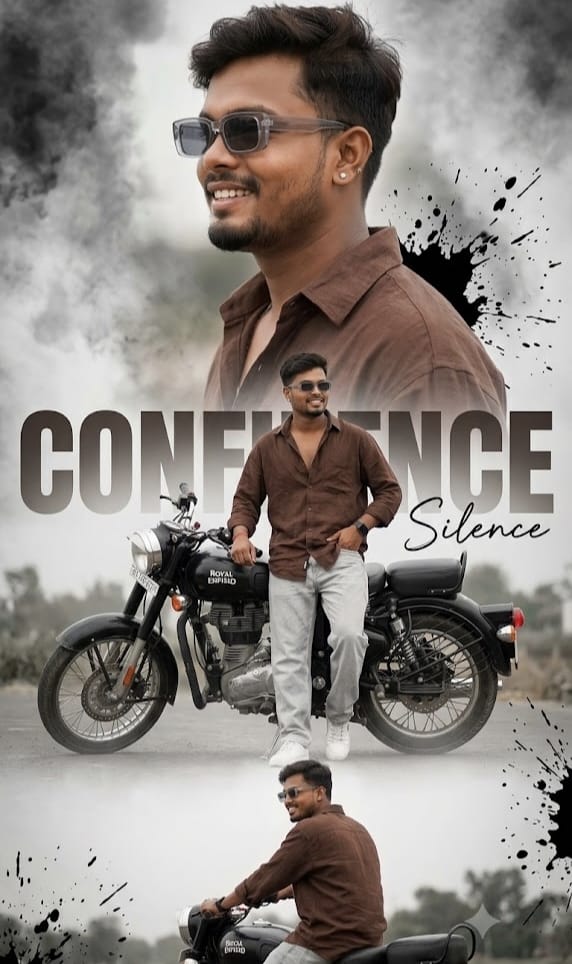
If you are looking to elevate your social media aesthetics with a hyper-realistic, high-fashion vibe, this AI image prompt is an absolute game-changer. Featuring a modern, stylish South Asian man paired with the iconic Royal Enfield motorcycle, this prompt generates an 8K cinematic vertical collage poster.
What makes this prompt unique is its incredible focus on editorial fashion details—from the chocolate-brown oversized shirt and transparent grey sunglasses to the subtle smoky grunge background with dynamic ink splashes. The clever blend of bold typography (“CONFIDENCE”) and handwritten elements (“Silence*”) gives your generated photo an immediate magazine-cover appeal. Whether you want to post it on Instagram Reels, Stories, or set it as a smartphone wallpaper, this dynamic composition guarantees a high-converting, professional DSLR-quality aesthetic.
The Premium Copy Card
Create an ultra-realistic 8K cinematic vertical collage poster featuring the same stylish young South Asian man in three dynamic compositions. Preserve the exartifacial features, warm smile, medium-brown skin tone, and transparent grey rectangular sunglasses. He wears an oversized chocolate-brown linen shirt with the top buttons open, light grey relaxed-fit jeans, white sneakens, a black smartwatch, and silver stud earrings. Include a large side-profile nortrait, a rear-view standing ull-body pose sitting casually on a black Royal Enfield motorcycle. Use a smoky grunge with black ink splashes, bold faded text CONFIDENCE, small handwritten text Silence*, soft HDR lighting, dramatic contrast, shallow depth of field, crisp details prentium fashion editorial style, DSLR 85mm lens, ultra-realistic color grading, sharp focus, 9/16 aspect ratio."
Read more: Create SRH Jersey AI prompt: Google Gemini, stylish ai poster
Pro-Tips Section
- Outfit Customization: Gar aapko shirt ka color change karna hai, toh “chocolate-brown linen shirt” ko replace karke “olive green oversized shirt” ya “black denim jacket” likh sakte hain.
- Bike Customization: Royal Enfield ki jagah aap apni favorite bike add kar sakte hain—jaise “KTM Duke 390,” “BMW GS 1250,” ya “Vintage Harley Davidson.”
- Text & Typography: Poster par likhe text ko personalized banane ke liye “CONFIDENCE” ki jagah apna naam ya tag jaise “ROYAL” ya “ATTITUDE” substitute karein.
- Aesthetic & Color Grading: Dark aesthetic pasand hai toh “smoky grunge” ki jagah “neon-lit cyberpunk street with rainy reflections” add kar sakte hain.
Step-by-Step Guide
Bing Image Creator: Par Kaise Use Karein:
- Upar diye gaye timer card se Copy Prompt button par click karke prompt copy karein.
- Bing Image Creator website open karein aur Microsoft account se login karein.
- Input box me prompt paste karein aur Create par click karein.
- 10-15 seconds for me and aapke samne 4 High-Quality cinematic images reaHigh-qualityi!
Midjourney Par Kaise Use Karein:
- Discord open karke apne Midjourney server ya bot DM me jayein.
- Text box me
/imaginecommand type karein aur space dabaen. - Copied prompt paste karein aur end me
--ar 9:16 --v 6.0include karein. - Enter press karein aur premium fashion collage output download karein.