
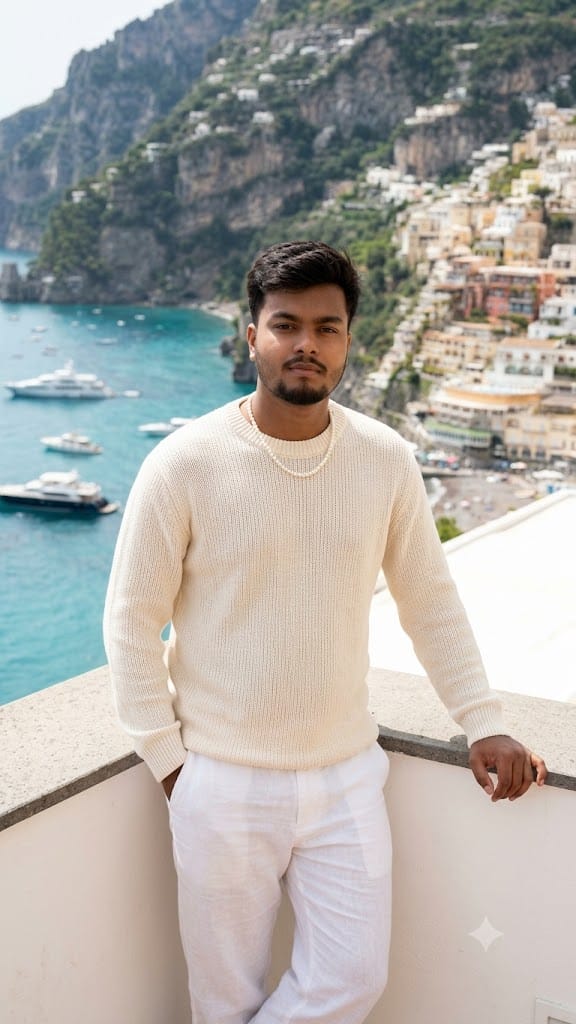
If you want to give your social media feed a high-end, ultra-luxurious aesthetic, this Luxury Summer Mediterranean AI image prompt is an absolute game-changer! Designed to capture the breezy elegance of European high fashion, this prompt places a young man on a sun-drenched white terrace overlooking a breathtaking coastal town.
With clean minimal vibes, soft natural daylight, and exquisite styling—featuring a cream knit sweater, white linen trousers, and a subtle pearl necklace—this prompt delivers imagery that looks straight out of a GQ spread or an Italian luxury campaign. Whether you’re building a personal brand, crafting aesthetic social posts, or exploring AI art, this prompt guarantees jaw-dropping, professional results every single time.
The Premium Copy Card
Luxury summer portrait of a young man standing on a white terrace overlooking a coastal town, cream knit sweater, white linen pants, pearl necklace, relaxed elegant pose, Mediterranean sea and boats in background, bright natural daylight, soft shadows, clean minimal aesthetic, high-end fashion photography."
Read more: Trending RCB IPL Jersey prompt: Virat Kohli style
Pro-Tips for Customization
- Outfit Customization: Agar aapko knit sweater replace karna hai, toh
"wearing an open beige silk shirt"ya"navy blue polo shirt"add kar sakte ho for a different luxury vibe. - Accessories: Add subtle extra details like
"wearing vintage gold sunglasses"jewelry"luxury Swiss watch on wrist"to elevate the aesthetic even further. - Background Change: Mediterranean sea ke jagah aap
"Amalfi coast view","Santorini blue domes in background", ya"French Riviera luxury yacht harbor"use kar sakte ho. - Lighting & Time: For a warm golden glow, simply swap.
Step-by-Step Guide (How to Use)
Option 1: Bing Image Creator (Free & Easy)
- Step 1: Uparwale card mein 15-second timer khatam hone ka wait karein aur “Copy Prompt” button par click karke text copy kar lein.
- Step 2: Search bar me
Bing Image Creatorsearch karein aur Microsoft account se login kar lein. - Step 3: Text box mein prompt paste karein aur apni pasand ke hisaab se koi bhi customize kar lein (jaise sunglasses add karna).
- Step 4: “Create” button par click karein. In just 10-15 seconds, aapke paas 4 ultra-realistic fashion images ready ho jayengi!
Option 2: Midjourney (For Ultra-Realistic Results)
- Step 1: Discord open karein aur kisi bhi Midjourney bot channel me jayein.
- Step 2: Type karein
/imagineaur prompt box me copy kiya gaya prompt paste kar dein. - Step 3: Better high-fashion camera output ke liye end me parameters add karein:
--ar 4:5 --style raw --v 6.0. - Step 4: Enter press karein aur high-resolution editorial portrait ka maza lein!