
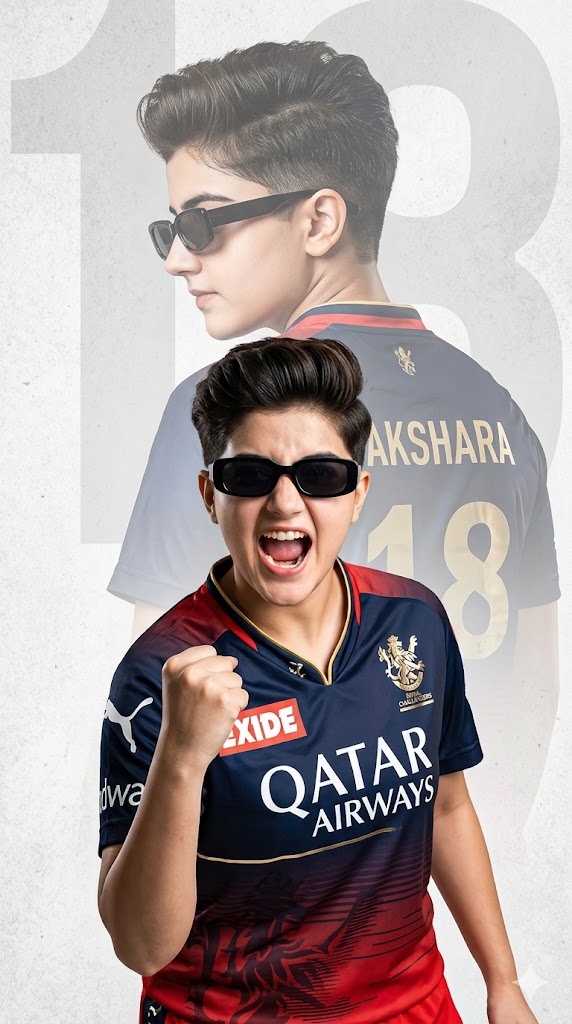
The passion of Royal Challengers Bangalore (RCB) fans is unmatched in cricketing history. To capture that intense, never-dying loyalty, standard filters won’t cut it anymore. This premium AI image prompt uses a sophisticated double exposure effect to combine raw fan emotion with sleek jersey typography, creating a stunning, commercial-grade athletic poster.
The composition highlights a young fan striking a fierce celebratory pose in the foreground while seamlessly blending into a larger backdrop silhouette that proudly features the iconic RCB kit, complete with custom text rendering for names and numbers. Complemented by trendy quiff styling, sharp rectangular sunglasses, and a textured studio background, this configuration delivers an elite design aesthetic perfect for wallpapers, prints, or viral social media posts.
The Premium Copy Card
Read more: Trending RCB girl AI photo prompt: Royal Challengers Bangalore
Pro-Tips to Customize Your AI Prompt
Aap image prompt ko bohot asaani se customize karke apna signature look bana sakte hain. Ye steps follow karein:
- Name aur Jersey Number Change Karein: Text box me jahan
'Akshara'aur'18'likha hai, wahan single quotes ke andar apna naam aur pasandida number type karein. Jaise ki, “displaying the name ‘Karan’ and the number ’07.'” Background watermark text ka number badalna na bhoolein! - Gender aur Appearance Edit Karein: Agar aap male avatar create karna chahte hain, toh prompt ki starting badal kar “A high-quality sports poster featuring a young South Asian man with an edgy fade haircut and short beard” kar sakte hain.
- Team aur Colors Switch Karein: Agar aapko kisi aur IPL franchise ke liye poster chahiye, toh bas team text modify karein. Jaise: “Wearing a Mumbai Indians (MI) cricket jersey in deep blue and gold… ”.
- Background Texture Badlein: Light gray flat backdrop ko change karne ke liye aap text me “dark atmospheric stadium background filled with smoky red neon glare” add kar sakte hain.
Step-by-Step Guide: How to Generate This Image
Is stylized graphic double exposure style ko create karne ke liye niche diye gaye rules follow karein:
For Bing Image Creator (Perfect Text Rendering)
- Platform Open Karein: Microsoft, Google Gemini, and ChatGPT or the Microsoft Designer official portal.
- Prompt Setup: Humare premium copy card se code unlock hone ke baad prompt copy karein aur dashboard space mein paste karein.
- Typography Rule: Bing text ko smoothly extract karta hai. Hamesha dhyan rakhein ki aapka name aur number single quotes (
'') me hi wrapped ho taaki jersey alignment behtar aaye. - Generate Karein: Create dabayein and complete processing. Agar double exposure layers pehli baar me standard na dikhein, toh 1-2 baar ‘Create’ fir se hit karein taaki clean face aura and backdrop shadow blend ho sake.
For Midjourney Users (V6 Engine)
- Command Run Karein: Discord channel ya private direct message par jaakar
/imaginepath initialize karein. - Parameters Add Karein: Core text copy-paste karne ke baad prompt ke bilkul end me professional aspect ratio set karne ke liye
--ar 9:16(mobile wallpaper format) zaroor lagayein. - Style Customization: High contrast cinematic texture details ke liye parameter cluster ke piche
--style rawtoggle add karein. Is se dynamic lightning auto-adjust ho jayegi.
1 thought on “RCB girl IPL AI Prompt: Gemini and ChatGPT”