
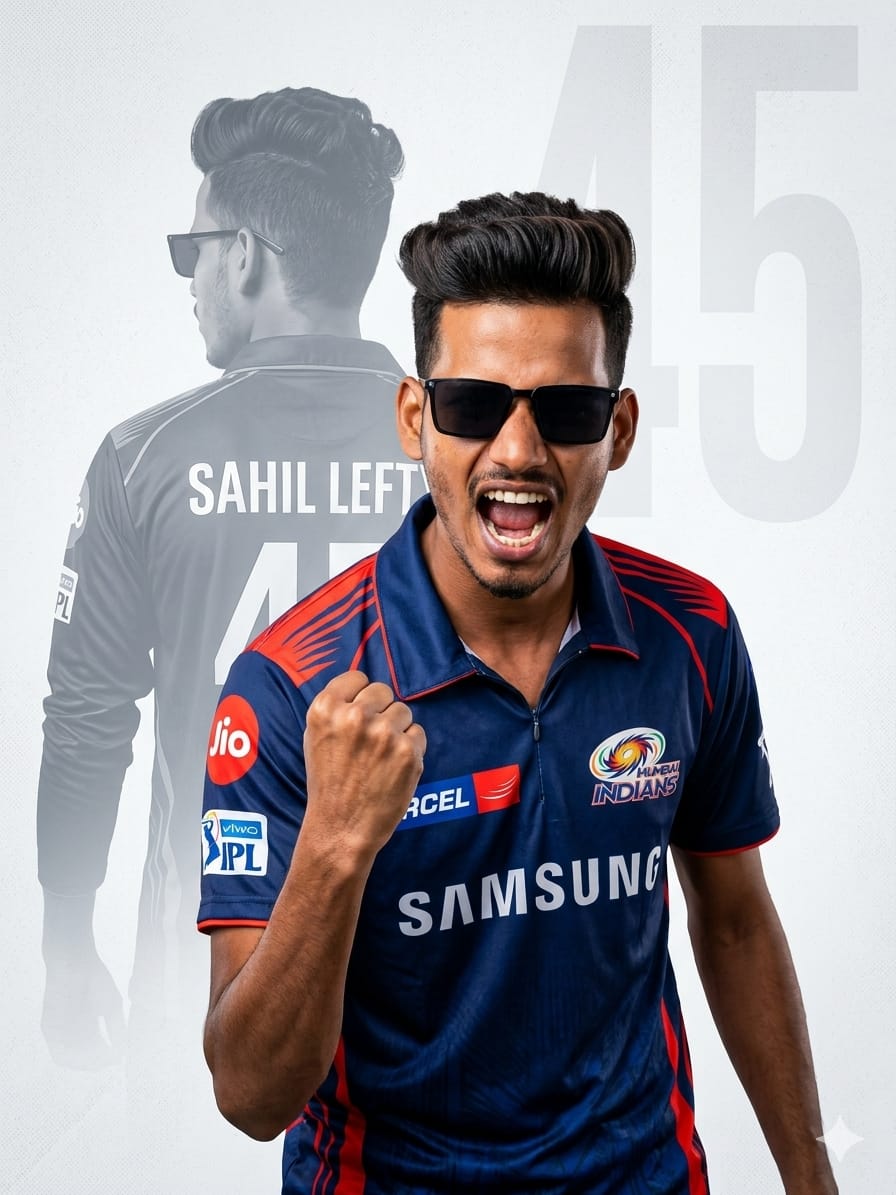
Are you a die-hard Mumbai Indians fan looking to celebrate the “Hitman” era? This AI image prompt is designed to create a high-end, professional sports poster that looks like it came straight from a sports magazine.
Featuring a trendy South Asian man in the iconic Navy Blue and Red MI jersey, the prompt uses a sophisticated double-exposure effect. It captures the raw energy of a triumphant celebration alongside a powerful silhouette of the legendary Number 45. Whether you want to showcase your love for Rohit Sharma or customize it with your own name, this prompt delivers sharp, 8k cinematic results that are perfect for Instagram, DP, or even high-quality wall prints. Let’s get you that “Paltan” look!
The Premium Copy Card
Read more: Virat Kohli RCB Fan AI Prompt (2026 Jersey Edition)
Pro-Tips Section
- Apna Naam Likhein: Prompt mein ‘Rohit Sharma’ ko replace karke apna naam likhein (e.g., ‘Aman Gupta’).
- Number Customize Karein: ’45’ ki jagah apna lucky number ya favorite player ka number daalein.
- Jersey Colors: Agar aapko purani MI jersey chahiye, toh “Light Blue and Gold” specify karein.
- Face Details: Agar aap beard style ya hair style change karna chahte hain, toh “Bearded man” ya “Buzz cut hair” add kar sakte hain.
Step-by-Step Guide
- Prompt Copy Karein: Sabse pehle upar diye gaye box se prompt copy karein (15 seconds wait karein).
- AI Tool Open Karein: Bing Image Creator (Microsoft Designer) ya Midjourney par jayein.
- Paste & Edit: Text area mein prompt paste karein. Agar aapko apna naam chahiye, toh ‘Rohit Sharma’ ko edit karke apna naam likhein.
- Generate Karein: Generate button par click karein aur magic dekhein.
- Download & Share: High-resolution image ko save karein aur apne social media status par lagakar dosto ko impress karein!
1 thought on “Mumbai Indians Rohit Sharma Fan AI Prompt: Create Your Own 45 Poster”