
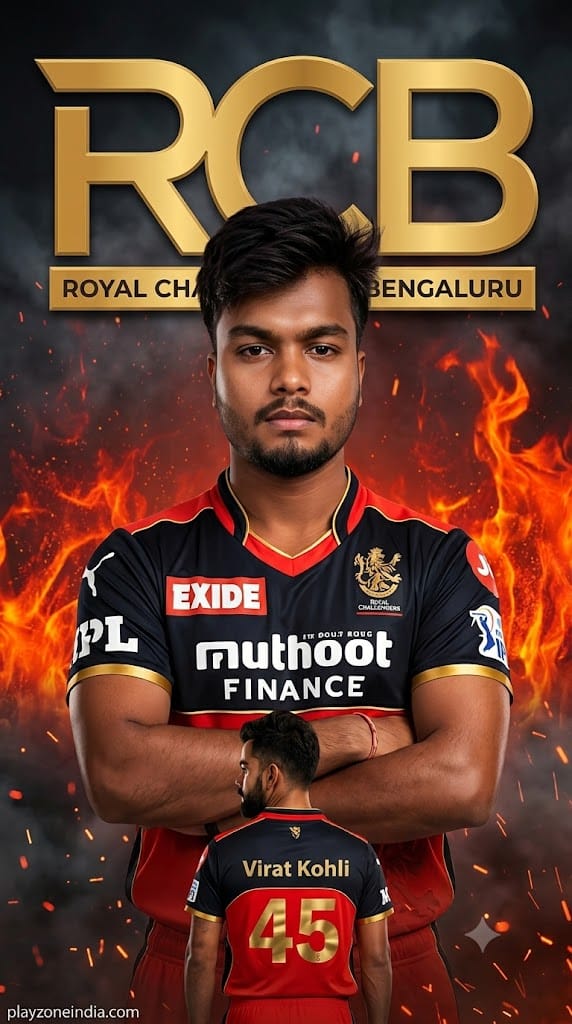
IPL season ka fever high hai, aur social media par custom cricket team posters aag ki tarah viral ho rahe hain! Agar aap bhi Royal Challengers Bengaluru (RCB) ke sachche fan hain aur ek high-end, cinematic, aur hyper-realistic poster banana chahte hain—jismein aapka face bilkul match kare—to yeh blog post khaas aapke liye hai.
This premium AI prompt lets you generate a jaw-dropping 9:16 portrait featuring the iconic red and black jersey, complete with authentic sponsors like Muthoot Finance and the majestic gold lion badge. With dramatic fire embers and a dual-pose effect (front view and a back view showing your name/jersey number), this image looks like an official franchise marketing campaign. Let’s get your viral poster ready!
The Premium Copy Card
Generate a hyper-realistic AI fan poster of a person wearing the Royal Challengers Bengaluru (RCB) IPL cricket jersey in red and black with "MUTHOOT FINANCE" sponsor text on the chest and the RCB Royal Challengers lion badge on the jersey. The person is standing in a relaxed confident pose with arms crossed or slightly open, facing the camera with a serious expression. Behind the person is a large bold golden metallic "RCB" logo text taking up most of the upper background, with the full team name "ROYAL CHALLENGERS BENGALURU" written below it in smaller gold text. A smaller second version of the same person appears in the lower foreground in a back-facing pose showing the name "Virat Kohli" and jersey number "45" in gold. The background features dramatic red and orange fire flames, flying embers, and dark smoky atmosphere. The face must be 100% identical to the uploaded reference photo — preserve all facial features, skin tone, hairstyle, beard, and expression exactly. Add subtle small Arial font watermark text "playzoneindia.com" at the bottom left corner in a light transparent colour. Image aspect ratio 9:16. Photorealistic, cinematic poster quality, ultra HD. Watermark:"
Read more: Trending RCB IPL Jersey prompt: Virat Kohli style
Pro-Tips Section
Aap is prompt ko apne hisaab se customize karke aur bhi personal aur unique bana sakte hain:
- Name Change: Prompt ke lower foreground section mein jahan
"Virat Kohli"likha hai, wahan aap apna khud ka naam (jaise"Tribhuvan"y”Ya”) add karein taaki jersey par aapka naam dikhe. - Jersey Number:
"45"ki jagah aap apna favorite number ya lucky number (jaise18,77) type kar sakte hain. - Face Swap Magic: Kyunki isme face precision ki strict demanding hai, Midjourney ka use karte waqt InsightFaceSwap bot ka use karein, ya phir image generate hone ke baad kisi premium face-swapper tool se apna clean, well-lit portrait photo replace kar lein perfect accuracy ke liye.
- Vibe Settings: Agar aapko background mein fire aur smoke nahi chahiye, toh aap use badalkar
"stadium lights, bokeh effect, and falling golden confetti"likh sakte hain ek celebratory look ke liye.
Step-by-Step Guide
Poster create karne ka poora process bahut aasan hai, bas in steps ko follow karein:
For Midjourney Users:
- Prompt Copy Karein: Sabse pehle upar diye gaye custom block se prompt ko copy kar lein.
- Discord Open Karein: Go to your Midjourney Discord server and type the command.
- Prompt Modify Karein: Copy kiye gaye text ko paste karein aur name/number brackets ko update karein.
- Reference Image Add Karein: Perfect face lock ke liye apni ek high-quality front-facing photo ko generate button dabane se pehle image link ke roop mein prompt ke aage attach karein aur
--iw 2.0(Image Weight) set karein taaki features exact copy ho sakein.
For Bing Image Creator / Copilot:
- Bing Creator par jayein: Microsoft Bing Image Creator web portal open karein aur login karein.
- Paste & Run: Humara ready-to-use prompt text bar mein paste karein.
- Generate Button Press Karein: Kuch hi seconds mein AI aapko 4 behtareen variations generate karke de dega. Jo best lage, use Ultra HD mein download kar lein!