
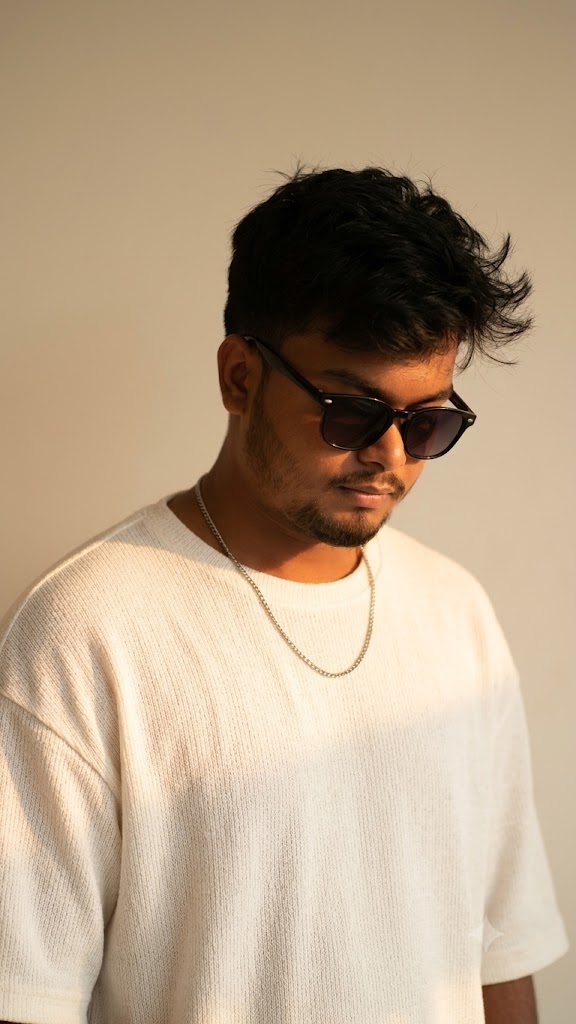
If you are looking to create high-quality, emotionally resonant, and aesthetically pleasing portraits, this dreamlike cinematic AI image prompt is exactly what you need. It captures a beautiful, moody atmosphere featuring soft textures, warm lighting, and a cool, effortless style. By emphasizing specific fabric details like a knitted oversized shirt and dramatic amber sunlight, this prompt ensures your AI art looks hyper-realistic yet deeply poetic. Whether you want to upgrade your social media aesthetic, design unique profile pictures, or experiment with cinematic storytelling, this premium prompt will generate breathtaking visuals that stand out.
Premium Copy Card
AI Prompt
Apply this prompt to my uploaded image Dreamlike cinematic portrait of a young man with tousled black hair, wearing a knitted white oversized shirt made of soft textured fabric. A single Silver thin necklace enhances his style. His sunglasses create a cool aura as he lowers his head gently. Sunlight in warm amber tones brushes his face and shoulder, glowing against a neutral cream wall: plz, face dont change."same face"
Read more: Create SRH Jersey AI prompt: Google Gemini, stylish ai poster
Pro-Tips Section (Hinglish)
- Keep the Same Face (Apna Face Kaise Use Karein): Agar aap chahte hain ki AI image me aapka ya kisi specific person ka face bilkul change na ho, toh image-to-image feature ka use karein. Midjourney mein image URL paste karein aur text prompt ke end mein
--iw 2.0(Image weight max) set karein taaki face features mimic ho sakein. - Hair & Style Customize: Aap
tousled black hairko change karkewavy brown hairyaclean fade haircutlikh sakte hain apne real look se match karne ke liye. - Outfit Customization:
knitted white oversized shirtki jagah aapblack leather jackettry kar sakte hain realistic vibes ke liye. - Lighting Changes:
warm amber tonesko badal kar aapcool blue neon lightyagolden hour sunset lightinglikh kar alag mood create kar sakte hain.
Step-by-Step Guide (Hinglish)
How to Use Midjourney (For Same Face Consistency):
- Image Upload Karein: Sabse pehle Discord par apna reference photo upload karein jiska face change nahi karna hai.
- Link Copy Karein: Uploaded image par right-click karke uska direct link copy kar lein.
- Prompt Type Karein:
/imagineCommand type karein, pehle photo ka link paste karein, fir ek space dekar upar diya gaya premium prompt paste karein. - Parameters Add Karein: Prompt ke bilkul end me
--iw 2.0likhein (yeh AI ko strictly aapka face follow karne ke liye force karega). Enter press karein aur cinematic result enjoy karein!
How to use on Bing Image Creator / Copilot:
- Platform Open Karein: Bing Image Creator ya Microsoft Copilot open karein.
- Text Paste Karein: Humare copy card se prompt ko copy karke box me paste karein.
- Generate Par Click Karein: Create button dabaen. (Note: Bing par seamless face swap ke liye aap image generate karne ke baad Remaker AI ya InsightFace tool ka use karke apna face accurately swap kar sakte hain).