
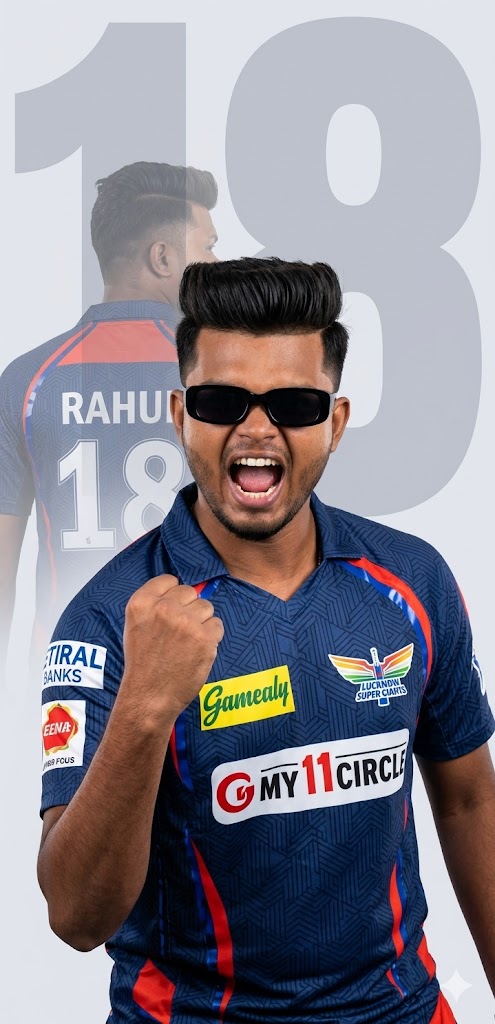
Cricket fever is always at an all-time high, and it’s time to show your support for the Lucknow Super Giants in the ultimate style! If you want to elevate your social media game with a viral-worthy profile picture or a premium smartphone wallpaper, this LSG Double Exposure AI Image Prompt is exactly what you need.
This prompt blends high-end graphic design with cutting-edge AI art generation. It creates a striking visual contrast using a double exposure effect: an intense, triumphant celebration in the foreground combined with a giant, majestic silhouette on the back showing off your custom name and iconic jersey number. Styled with the distinct LSG navy blue and red kit, sharp quiff hair, and sleek sunglasses, this poster delivers a cinematic 8k resolution master copy that looks like it was designed by a professional sports media agency.
The Premium Copy Card
Read more: LSG girl IPL AI prompt: Lucknow super giants
Pro-Tips Section (Customization Guide)
Is AI prompt ko aap apni pasand ke mutabiq poori tarah badal sakte hain. Best result paane ke liye ye points dhyan se follow karein:
- Naam Kaise Badlein: Prompt me jahan
'RAHUL'likha hai, use hata kar single quotes ke andar apna khud ka naam capital letters me likhein (e.g., NAME). Capital letters se text rendering crystal clear aati hai. - Jersey Number Customization: Is the design of my jersey number displayed in two places—a silhouette and a background watermark? Isliye jahan bhi
'18'likha hai, wahan apna favorite number (jaise) replace karna na bhoolein. - Face & Hairstyle Alteration: Agar aapko clean look ya koi aur style chahiye, toh
quiff-style hairki jagah aapslicked-back hair, “ya”short beard styleadd kar sakte hain. - Different Team Variant: Agar aap LSG ke alawa kisi aur team (jaise MI, CSK, ya KKR) ka design chahte hain, toh bas LSG
Lucknow Super Giants (LSG)ko replace karein aur unke official colors (jaise gold and purple for KKR) description me mention kar dein.
Step-by-Step Guide
AI image generator ka use karke aisi premium high-definition images nikalna bohot easy hai. Bas niche diye gaye steps ko follow karein:
For Bing Image Creator:
- Sabse pehle upar diye gaye custom timer card se prompt ko copy kar lein.
- Apne device me Bing Image Creator (Microsoft Designer) open karein aur log in karein.
- Input text box mein prompt ko paste karein aur apna Name aur Jersey Number customize karein.
- Create a pair click. AI kuch hi seconds mein aapke samne 4 mind-blowing professional designs generate kar dega.
- Jo image sabse acchi lage, uspe click karke high definition (HD) mein download kar lein.
For Midjourney:
- Apne Discord account par jaakar Midjourney bot ya server ko open karein.
- Chat area mein
/imaginecommand type karein aur prompt box mein hamara text paste karein. - Text ko check karne ke baad, wallpaper format ya wider frame ke liye prompt ke bilkul end me
--ar 16:9ya--v 6.0jarur lagayein. - Enter press karein aur upscale (U1, U2, U3, U4) ka use karke apni ultra-realistic image save kar lein.