
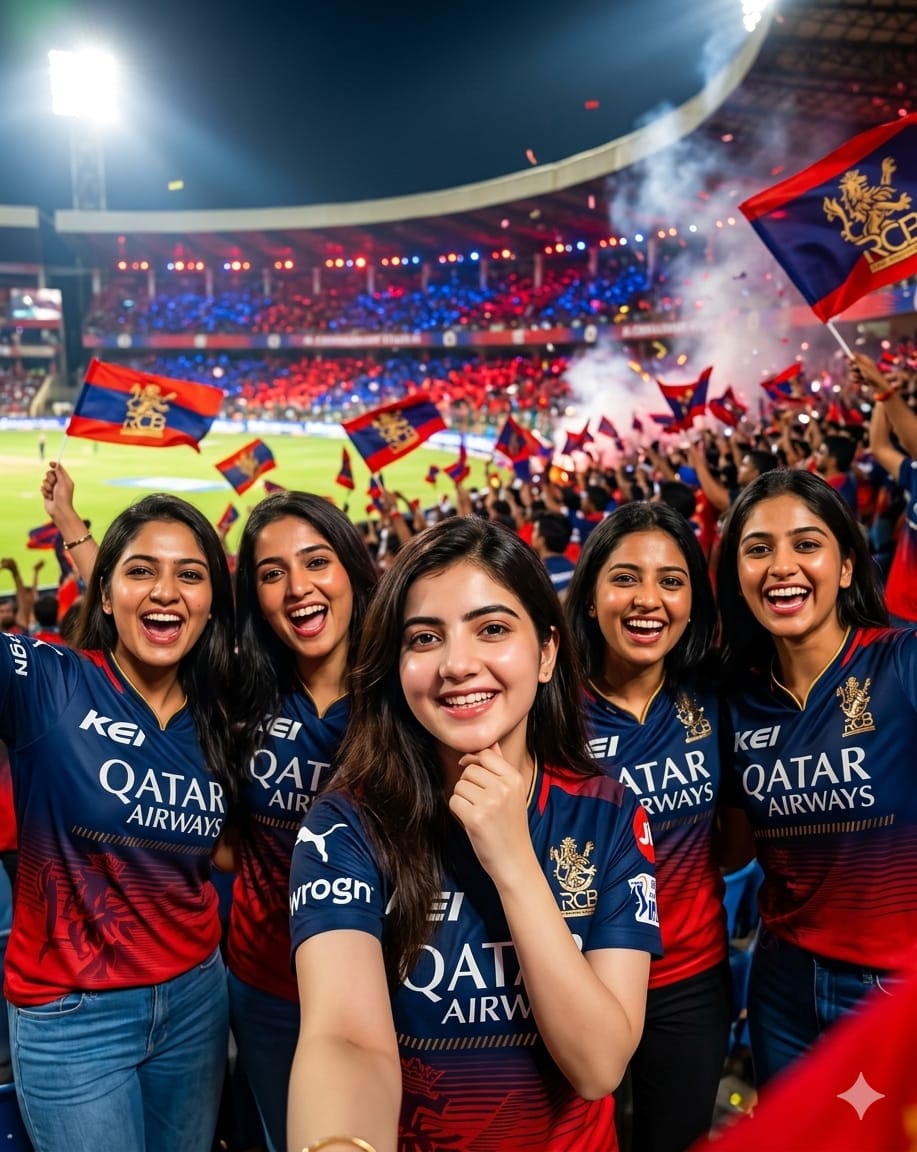
The craze for Royal Challengers Bengaluru (RCB) is unmatched, and their fans are known to be the loudest and most passionate in cricket history! If you want to capture that electric, red-and-blue stadium energy in a digital masterpiece, this premium AI image prompt is exactly what you need.
This prompt generates a stunning, high-quality 8K cinematic photo featuring a group of 5 young South Asian women proudly sporting the modern RCB jerseys. Set against the backdrop of a roaring, packed night-match stadium illuminated by dramatic floodlights, it perfectly replicates the high-octane atmosphere of a live IPL match. Whether you are looking to create viral edits for social media, design eye-catching fan pages, or showcase your loyalty to the Bold Army, this realistic prompt delivers flawless skin textures and professional sports photography style every single time.
The Premium Copy Card
Read more: Trending RCB girl AI photo prompt: Royal Challengers Bangalore
Pro-Tips Section (Customization Guide)
Is prompt ko aap apni pasand ke hisaab se aur zyada unique bana sakte hain. Yeh kuch kamaal ke customization tips hain jinhe aap try kar sakte hain:
- Jersey Pe Name Aur Number Add Karein: Agar aap chahte hain ki jerseys par aapka pasandida number ya naam likha ho, toh prompt mein yeh lines jodiye: “wearing modern RCB jerseys with the name ‘KOHLI’ and number ’18’ boldly printed on the back.”
- Face Paint or Cheer Props: To give the image a zyada crazy fan look dene ke liye, you can write, “with red and black face paint on their cheeks and holding glowing RCB cheer sticks.”
- M. Chinnaswamy Stadium Vibe: Agar aap Bengaluru ke home ground ka look chahte hain, toh prompt mein add karein: “standing inside the historic M. Chinnaswamy Stadium, with an intense sea of red in the stands.”
- Group Size Aur Poses Change Karein: Aap group size ko badal ya kam kar sakte hain, jaise: “a group of 3 close friends taking a selfie while smiling excitedly”.
- Kisi Aur Team Mein Badlein: Agar aap MI ya KKR ke fan hain, toh bas team ka naam aur color theme change kar dein. Example: “wearing Mumbai Indians jerseys with a vibrant theme of blue and gold.”
Step-by-Step Guide
AI images generate karna behad aasan hai! Bas niche diye gaye simple steps ko follow karein:
For Bing Image Creator (Free & Fast)
- Website Open Karein: Sabse pehle apne browser mein Microsoft Bing Image Creator (Copilot Designer) ki official website par jaayein.
- Login/Sign-in: Apne Microsoft account se login karein. Agar account nahi hai, toh ek naya free account bana lein.
- Prompt Paste Karein: Hamare premium card se unlocked prompt ko copy karein aur Bing ke text input field mein paste kar dein.
- Badlaav Karein (Optional): Agar aapko jersey par koi specific name ya number chahiye, toh prompt text ko modify kar lein.
- Generate Par Click Karein: Dabayein the ‘Create’ button. Kuch hi seconds mein AI aapke liye 4 behtareen high-quality images generate kar dega. Apni favorite image select karke download kar lein!
For Midjourney (Premium Quality)
- Discord Server Par Jaayein: Open your Midjourney Discord account ya web alpha interface.
- Command Type Karein: Chat box mein
/imaginetype karein aur prompt prompt box ko select karein. - Reference Image Use Karein: Agar aapke paas koi face reference image hai, toh uske URL ko prompt ke shuruat mein dalein, fir hamara copied prompt paste karein.
- Parameters Lagayein: Cinematic cinematic landscape cinematic ya mobile screen cinematic ke liye text ke end mein aspect ratio parameter jodiye, jaise (for desktop) ya
--ar 9:16(for mobile view). Best realism ke liye--v 6.0aur--style rawuse karein. - Upscale Aur Save: Chaaron options mein se jo bhi image best lage use
U1, U2, U3, U4buttons ka use karke upscale karein aur high resolution mein save kar lein.